

















Teaching

Research
Miscellaneous
Introduction
The Consortium for Upper-level Physics Software (an international team of 27 physicists, of course it has nothing to do with CUPS) has edited nine books dedicated to various domains in physics:
- Astrophysics Simulations
- Electricity and Magnetism Simulations
- Classical Mechanics Simulations
- Modern Physics Simulations
- Nuclear and Particle Physics Simulations
- Quantum Mechanics Simulations
- Solid State Physics Simulations
- Thermal and Statistical Physics Simulations
- Waves and Optics Simulations
So, why do I want to run CUPS software under a Linux OS? This could appear as a challenging task as these old DOS program no longer run on recent Windows machines. In fact, I find these CUPS software extremely useful for my teaching (particularly for electromagnetism) and I definitively prefere Linux OS (like DEBIAN) than Microsoft OS. As we shall see this is not so difficult, we shall proceed in two steps: (1) installation of
DOSEMU and FreeDOS, (2) patch of CUPS binaries.
DOSEMU and FreeDOS installation
The method used here should be Linux distribution independant, then it should work for Debian, Mandrake, etc. The steps to be followed are:
- DOSEMU installation If you don't have DOSEMU already installed on your machine, download an uptodate archive (named for instance dosemu-1.2.2-bin.tgz) of binaries here and uncompress it in a given directory, for instance ~/work, with a command like this:
tar xvfz dosemu-1.2.2-bin.tgz
- FreeDOS installation on the same principle dowload the archive containing FreeDOS binaries and uncompress it:
~/work/dosemu/xdosemu
Your "
C:\" disk will be:
~/work/dosemu/freedos
Just to check that all the things work properly, go to "
~/work/dosemu/" and type:
xdosemu
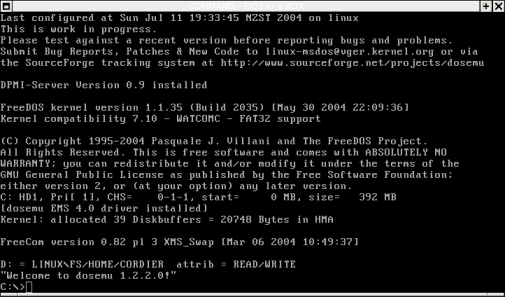
you should get the following window poping up:
- # Start DOSEMU in fullscreen mode. Default = "off"
- # $_X_fullscreen = (off)
conf/dosemurc" (set it and copy in your home directory).
In order to specify (it is needed for some CUPS programs) our keyboard mapping, in "
~/.dosemurc" uncomment the relevant line, e.g. for an french keyboard:
- $_layout = "fr"
exitemu
Patch of CUPS softwares
See the page of Andy Dougherty from the Lafayette College Physics Department: http://ww2.lafayette.edu/~doughera/cups, he gives 4 patches in the form of *.bat executable
DOS files.
Copy the files from CUPS floppy disk in freedos directory, typing for instance in a Linux shell:
cp /mnt/floppy/* ~/work/dosemu/freedos
You should get tree files:
em.exe(in the case of "Electricity and Magnetism Simulations" sofware)install.batreadme
install.bat" script (in the xdosemu window, i.e. after "C:\>" prompt) :
install.bat
A directory "
C:\CUPS\CUPSEM" is created by the program. Non-US users should notice that in xdosemu
windows, the keyboard is supposed to be a QUERTY one (e.g. with an AZERTY keyboard type "," for "m", to get
"." type ":", etc). Running
the CUPS software "cupsem.exe" on an Intel 500MHz one gets:
Runtime error 200 at 06D9:0091.This problem can be easily fixed thanks to Andy Dougherty's scripts and Klaus Hartnegg's program.
- first download the "
tppatch.exe" from Andy Dougherty's web page or from the orginal Klaus Hartnegg's page, copy this program in~/work/dosemu/freedos/cupsdirectory (equivalent toC:\CUPS) - download the appropriate Andy Dougherty's script (called "
patchem.bat" in our example) his page and copy this files in~/work/dosemu/freedos/cupsdirectory; finally run the script.
Running CUPS
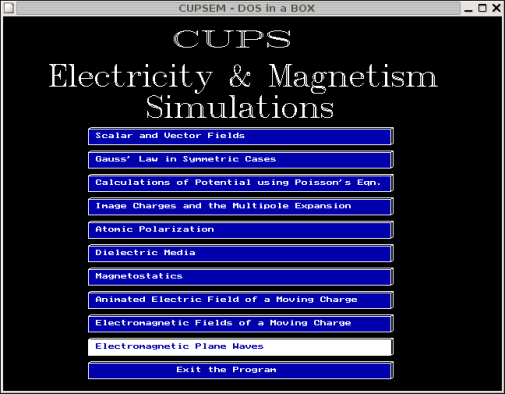
Now, you are ready to run
CUPSEM software on your Linux (faster than 200 MHz machines) system:
Other batch files for CUPS softwares
Here are some batch files I wrote and which are not available on the Andy Dougherty's page:
- patchtp.bat for CUPS Thermal and Statistical Physics programs
- patchas.bat for CUPS Astrophysics programs
To do
Compile CUPS program sources with Free Pascal compiler.
| Daniel Cordier, Laboratoire GSMA - Université de Reims, |
|||||
|---|---|---|---|---|---|